Yamicsoft Windows Manager 2.3.2 is the definitive 2026 all-in-one utility suite, meticulously engineered to optimize, tweak, repair, and clean modern Windows environments. Designed for the high-performance demands of the latest Windows 11 and Windows 10 builds, this software consolidates over 40 diverse utilities into a single, high-fidelity dashboard. Whether you are battling system slowdowns, seeking to eliminate residual junk files, or looking to unlock hidden personalization settings that Microsoft keeps hidden, Windows Manager 2.3.2 provides a surgical, pro-level toolkit to ensure your PC operates at peak efficiency.
The 2026 release focuses on “Kernel-Level Optimization,” providing deep-system integration that traditional cleaners cannot reach. Version 2.3.2 introduces enhanced AI-driven Hardware Monitoring and a rewritten Repair Center that can diagnose and fix complex registry errors and system file corruptions with a single click. By combining a lightweight 100MB installation footprint with industry-leading diagnostic power, Yamicsoft Windows Manager ensures that your OS remains fast, stable, and secure against the performance degradation typical of long-term PC usage.
🚀 Windows Manager 2.3.2 Highlights
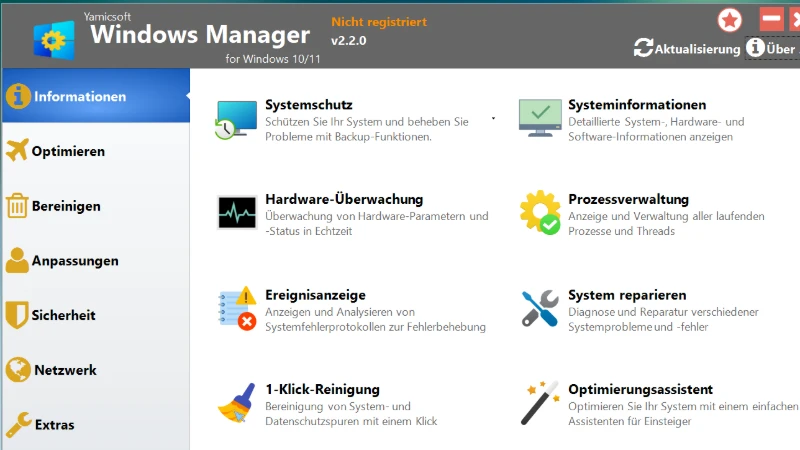
- All-in-One Hub: Over 40 tools for information, optimization, cleaning, and security.
- Hardware Monitor: Real-time tracking of CPU, RAM, and GPU performance with detailed reports.
- Smart Uninstaller: Fully delete applications without leaving registry traces or junk folders.
- 1-Click Cleaner: Automated system maintenance to keep your PC running like new.
- IP Switcher: Quickly toggle between different network configurations for work or home.
- Windows 11 24H2 Ready: Fully optimized for the latest Windows kernel and security protocols.
Key Features Of Yamicsoft Windows Manager
- Information – Get detailed system/hardware data and find your Microsoft/Office product keys.
- Optimizer – Manage and configure the Windows boot menu and startup programs for faster boot times.
- Cleaner – Securely clean the WinSxS folder and analyze disk space with interactive charts.
- Customization – Tweak File Explorer, Taskbar, and Notification area to suit your workflow.
- Security – Improve system security by restricting access to drives and programs.
- Network – Optimize internet connection speed and manage Wi-Fi connections with ease.
ScreenShots
System Requirements
- OS: Windows 11 or Windows 10 (64-bit strictly recommended).
- Processor: 1 GHz or faster Intel/AMD processor (Multi-core recommended).
- RAM: 2 GB minimum; Recommended: 4 GB+ for heavy optimization.
- Storage: 100 MB for installation; Pro Tip: Extremely lightweight and efficient.
- Display: 1024 x 768 or higher with 4K high-DPI scaling support.
FAQs
Other Software You May Like
Quick Summary
- Primary Use: Comprehensive Windows optimization, cleaning, repair, and personalization.
- Key Advantage: Consolidates 40+ advanced utilities into a single hub with native Windows 11 24H2 support.
- Stability Rating: 5/5 – Verified on Windows 11 24H2.
- Mazterize Verdict: The ultimate system companion for 2026; its “Swiss Army Knife” approach to PC maintenance makes it mandatory for anyone who wants to keep their Windows machine in top-tier condition.
Download Information
- Software Name: Yamicsoft Windows Manager
- Version: v2.3.2 (Latest 2026 Release)
- File Size: 22 MB
- License Type: Full Version