
Internet Download Manager (IDM) for Windows is a download acceleration tool built for users who regularly download large files, videos, software packages, and browser content. The software is widely used because it improves download speed while keeping transfers stable during weak or interrupted internet connections.
A lot of Windows users still prefer IDM because the browser integration works reliably across Chrome, Edge, Firefox, and other Chromium-based browsers. The software can automatically capture downloadable videos, resume interrupted transfers, and organize downloaded files without forcing complicated setup steps. Users already downloading media through 4K Video Downloader Plus or managing torrent downloads with uTorrent Pro will probably understand the workflow immediately.
The latest IDM release improves browser compatibility and fixes several download capture problems reported in older builds. Video detection also feels faster on streaming websites, and interrupted downloads resume more consistently after connection drops. The program still stays lightweight even while handling multiple downloads at the same time.
Key Features of Internet Download Manager
- Download acceleration
Split files into segments to improve download speeds on supported servers. - Browser integration
Works directly with Chrome, Firefox, Edge, Opera, and Chromium browsers. - Resume interrupted downloads
Continue paused or failed downloads without restarting the entire file. - Automatic video capture
Detect downloadable media from supported websites automatically. - Download scheduling
Schedule downloads and manage queued files during specific times. - File organization tools
Sort downloaded files into categories automatically.
What’s New in Internet Download Manager Latest Version
- Updated browser compatibility
Improved support for newer Chromium and Firefox browser builds. - Faster video detection
Streaming media links are captured more consistently on supported sites. - Improved resume stability
Interrupted downloads recover more reliably after network reconnects. - Cleaner Windows 11 support
The interface behaves more consistently on newer Windows systems. - Reduced background resource usage
Download handling feels lighter during large transfer sessions. - General bug fixes
Several browser extension and download queue issues were corrected.
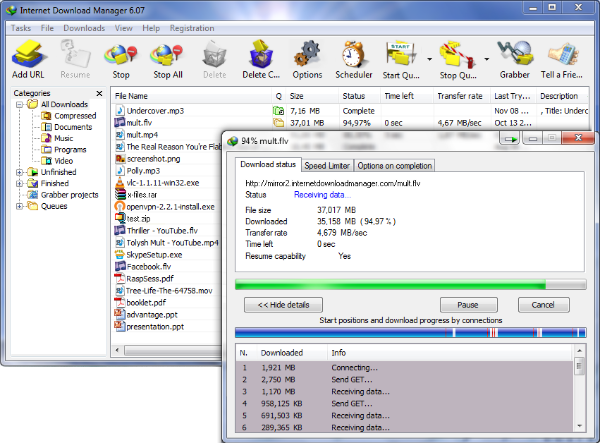
ScreenShots
System Requirements
- Operating System: Windows 10 / Windows 11
- Processor: Intel Pentium 4 or higher
- RAM: 2 GB minimum
- Storage: 200 MB free space
- Internet: Active internet connection required
Why I Recommend
IDM still works better than most download managers because the browser integration stays reliable even after browser updates.
I also like how quickly the software resumes interrupted downloads without corrupting large files halfway through a transfer.
And honestly, automatic video capture alone saves a lot of time if you regularly download tutorials, online courses, or large media files.
Technical Details
- Software Name: Internet Download Manager
- Version: Latest
- Developer: Tonec Inc.
- License Type: Full
- Supported OS: Windows
Download Information
Download | Size: 11.84 MB | Pass: Bicfic.in